Everyday practice
Analyze
See live waveform activity against musical gridlines, then freeze the recent take for closer review.
Percussion timing, made visible
BeatTrace keeps your microphone waveform, the metronome grid, and detected attacks together—so a vague timing problem becomes something you can hear, see, and work on.
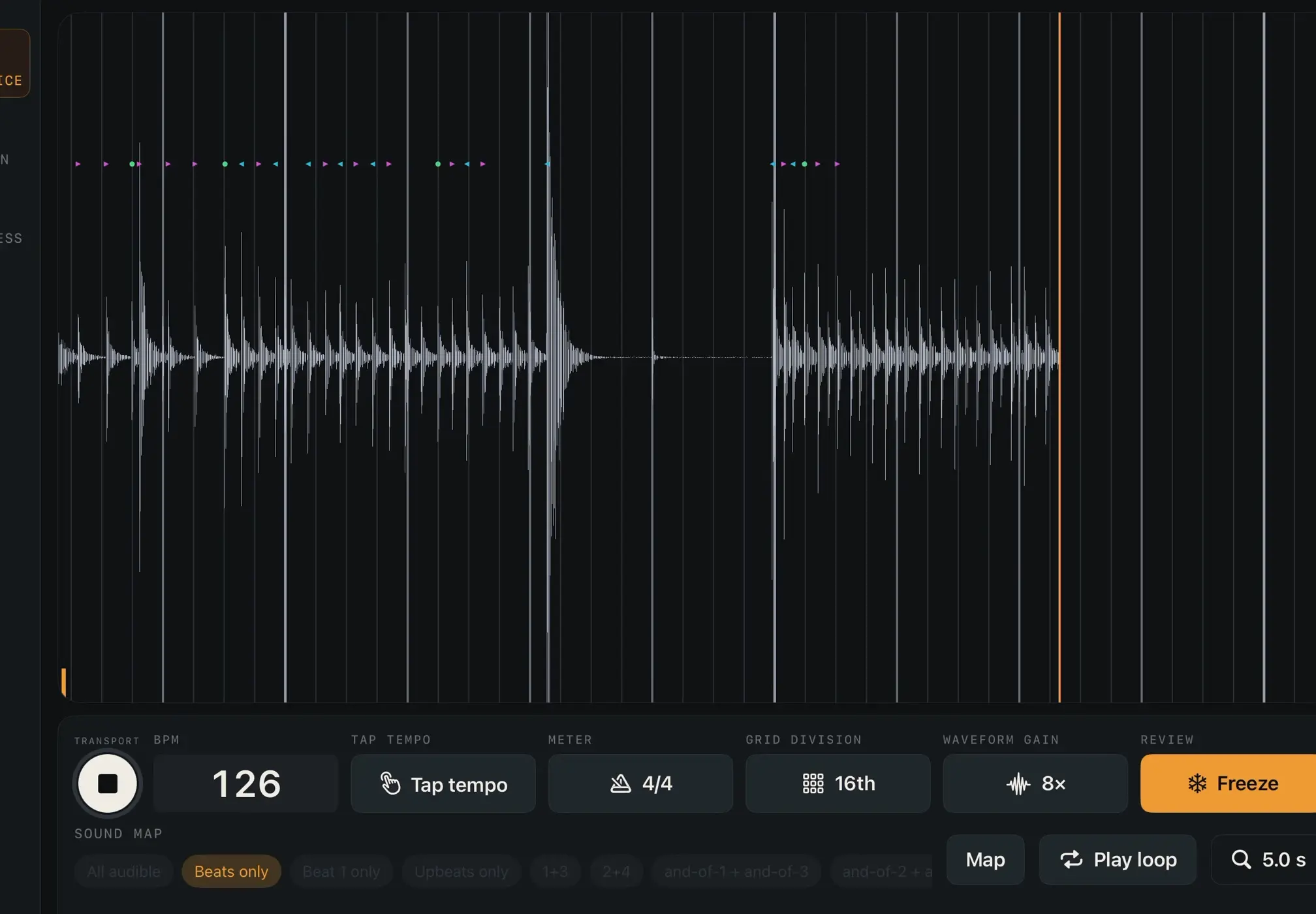
The grid is the reference. Your take is the evidence.
The practice loop
Everything centers on one useful question: what did your attack do relative to the time you meant to play?
Choose the BPM, meter, subdivision, and Sound Map that fit the passage.
The click, timing grid, microphone waveform, and detected attacks share one timeline.
Keep the take on screen, zoom into the waveform, select a loop, and listen again.
One shared timeline
BeatTrace’s core system schedules the click, draws the musical grid, maps microphone input, and scores detected attacks from one audio-sample master timeline. The redesign changes the experience around that system—not the system itself.
Inside BeatTrace
Start with the everyday practice view. Open more structure only when the work calls for it.
Everyday practice
See live waveform activity against musical gridlines, then freeze the recent take for closer review.
A clear assignment
Clapping, Blind, Cold Start, and Microscope Check flows make each listening and playing phase explicit.
Carry more of the time
Progressively reduced click information asks you to maintain subdivision with fewer external landmarks.
Keep the takeaway
Save guided results locally and return to a plain-language summary instead of a vague memory of the session.
Built for precision, not judgment
You bring the musical decision. BeatTrace keeps the timing evidence legible.
From the stand
“I built BeatTrace around a problem I meet in my own playing and teaching: ‘I think I’m rushing’ is hard to practice. Seeing the take gives the next repetition a specific job.”
Spencer Perilloux · percussionist, timpanist, and educator
Common questions
BeatTrace is still in development. Price, public availability, and release timing have not been announced.
BeatTrace is a native iPhone and iPad practice app in development for percussionists. It places detected note attacks, the microphone waveform, and the metronome grid together so you can study what happened in a short take.
Not publicly. This is a waitlist and product-validation page. No public App Store release date has been announced.
No price, pricing tier, trial, or checkout has been announced. Joining the waitlist is not a purchase, reservation, or promise of availability.
No. BeatTrace makes one timing relationship visible: detected attacks against the timing grid you selected. It cannot grade musicality, replace listening, or decide whether a performance is good.
The built-in speaker or wired audio are the intended setups for timing measurement. Bluetooth can be used for listening, but measurement is paused when latency would make the timing feedback untrustworthy.
No. The waitlist stores only the email address, selected audience option, consent record, and signup time you provide.
BeatTrace waitlist
Join if you want access updates and want to help validate what percussionists actually need from visual timing feedback.
This form stores only the email address, audience option, consent record, and signup time you provide. Read the plain-language privacy note.